


There is no doubt that the IT examination plays an essential role in the IT field. On the one hand, there is no denying that the C_S43 practice exam materials provides us with a convenient and efficient way to measure IT workers' knowledge and ability(C_S43 best questions). On the other hand, up to now, no other methods have been discovered to replace the examination. That is to say, the IT examination is still regarded as the only reliable and feasible method which we can take (C_S43 certification training), and other methods are too time- consuming and therefore they are infeasible, thus it is inevitable for IT workers to take part in the IT exam. However, how to pass the SAP C_S43 exam has become a big challenge for many people and if you are one of those who are worried, congratulations, you have clicked into the right place--C_S43 practice exam materials. Our company is committed to help you pass exam and get the IT certification easily. Our company has carried out cooperation with a lot of top IT experts in many countries to compile the C_S43 best questions for IT workers and our exam preparation are famous for their high quality and favorable prices. The shining points of our C_S43 certification training files are as follows.

Only need to practice for 20 to 30 hours
You will get to know the valuable exam tips and the latest question types in our C_S43 certification training files, and there are special explanations for some difficult questions, which can help you to have a better understanding of the difficult questions. All of the questions we listed in our C_S43 practice exam materials are the key points for the IT exam, and there is no doubt that you can practice all of C_S43 best questions within 20 to 30 hours, even though the time you spend on it is very short, however the contents you have practiced are the quintessence for the IT exam. And of course, if you still have any misgivings, you can practice our C_S43 certification training files again and again, which may help you to get the highest score in the IT exam.
Fast delivery in 5 to 10 minutes after payment
Our company knows that time is precious especially for those who are preparing for SAP C_S43 exam, just like the old saying goes "Time flies like an arrow, and time lost never returns." We have tried our best to provide our customers the fastest delivery. We can ensure you that you will receive our C_S43 practice exam materials within 5 to 10 minutes after payment, this marks the fastest delivery speed in this field. Therefore, you will have more time to prepare for the C_S43 actual exam. Our operation system will send the C_S43 best questions to the e-mail address you used for payment, and all you need to do is just waiting for a while then check your mailbox.
Simulate the real exam
We provide different versions of C_S43 practice exam materials for our customers, among which the software version can stimulate the real exam for you but it only can be used in the windows operation system. It tries to simulate the C_S43 best questions for our customers to learn and test at the same time and it has been proved to be good environment for IT workers to find deficiencies of their knowledge in the course of stimulation.
After purchase, Instant Download: Upon successful payment, Our systems will automatically send the product you have purchased to your mailbox by email. (If not received within 12 hours, please contact us. Note: don't forget to check your spam.)
SAP C_S43 Exam Syllabus Topics:
| Section | Objectives |
|---|---|
| Topic 1: Asset Management in SAP S/4HANA Cloud Private Edition | - Enterprise Asset Management Overview
|
SAP Certified Implementation Consultant - SAP S/4HANA Cloud Private Edition, Asset Management (C_S43_2601) Sample Questions:
Task 11: Classify a piece of Equipment
The project team evaluates during the implementation project the classification of Technical Objects in order to use Checklists in SAP S/4HANA Asset Management. The following features need to be checked:
* Assign a class to a Technical Object
* Assign chararcteristic values to a class
* Assign class EQ11 value to Technical Object T-PA## .
* Assign a characteristic value, so that Inspection Plan Q / CL-DE-00 / 1 is automatically found during the checklist process
Correct Answer:
See the Explanation for complete Solution of this Task.
Explanation:
Task 11 Overview
This task involves classifying a piece of equipment so it can be used in the Checklist process . By assigning a specific class and characteristic values, you enable the system to automatically find the correct inspection plan when a maintenance order is created.
Step 1: Access the Equipment Master Record
To classify the equipment, you must first open its master record in "Change" mode.
* Transaction Code : Enter IE02 (Change Equipment) in the command field and press Enter .
* Equipment : Enter T-PA48 .
* Action : Press Enter to open the record.
Step 2: Assign the Class to the Equipment
Now you will link the equipment to a class that contains the required technical characteristics.
* Navigate : Click the Classification button in the top toolbar (or go to the Classes tab if available).
* Class Assignment :
* Class Type : Ensure this is set to 002 (Equipment Class).
* Class : Enter EQ11 .
* Action : Press Enter . The system will now display the characteristics associated with class EQ11 in the bottom half of the screen.
Explanation : Assigning a class is like giving the equipment a "category". Class EQ11 is specifically configured in this system to hold the data needed for checklist processing.
Step 3: Assign Characteristic Values
This is the critical step that tells the system exactly which inspection plan to use for this specific pump.
* Locate the Characteristic : In the values table, look for a characteristic related to "Inspection Plan" or
"Checklist Group."
* Enter the Value : Assign the value so that Inspection Plan CL-DE-00 / 1 is automatically found.
* Note: Typically, you will enter CL-DE-00 in the "Inspection Plan Group" field and 1 in the
"Group Counter" field.
* Action : Press Enter to validate the values.
Explanation : Characteristic values are the specific details for this asset. By entering these values, you "tag" the equipment so that whenever it is added to a maintenance order, the system knows to look for the CL-DE-
00 checklist automatically.
Step 4: Save
* Action : Click the Save (floppy disk) icon.
* Confirmation : The system should display a message at the bottom saying: "Equipment T-PA48 changed."
In the following assessment you will slip into the role of a consultant implementing SAP S/4HANA Asset Management OnPrem/Private Cloud for Machine Manufacturing Inc. . You need to fulfill various system tasks to setup certain business processes and test them.
Note:
In the task descriptions is no information provided if and/or how Asset Management specific customizing settings need to be adapted. This is an implicit part of the exam.
Note:
There is no information provided which UI to use when creating the data in the system e.g. SAP GUI, SAP Fiori Launchpad. This is an implicit part of the exam.
Your performance in each exercise will be evaluated to produce an overall score that determines a pass or fail for the exam. Please read every exercise carefully and enter any data exactly as requested without alteration. Some input data is provided in tables or in the task descriptions, however your input data is not limited to these parameters.
Use the following Logon information for all tasks:
Caution:
Please make sure you are always using your assigned group number (denoted as ## in the following) .
Your results will not be recorded if you are not using your own group number.
For example, if your group number is 10 i.e. (## = 10), your user will be S43900-10.
To find your group number: Click the Access button on the practice system details page. You will find your group number displayed beneath the "Get started" header in the pop-up window. Alternatively, in your Windows Terminal Server, choose the Windows button in the lower left corner. The Start Menu opens. It its upper left corner, choose the Expand icon (three white lines). Find your user name next to the user icon on the left side of the menu - the last two digits of the user name are your group number ##.
Note:
To access your backend system in the Windows Terminal Server, open the SAP Logon application and start the T41 system (Client 400 ). You can access the SAP Fiori Launchpad from the SAP Menu in T41. Always work with user S43900-## in order to have the required roles in place for your tasks.
Caution:
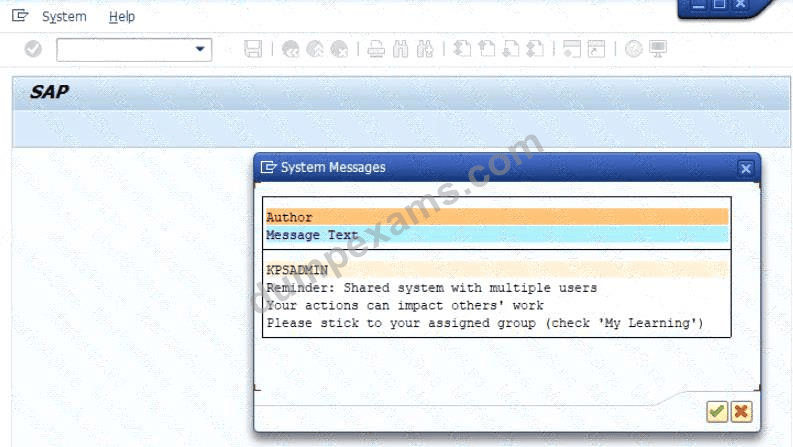
To keep the system running smoothly and avoid unnecessary costs, please follow the assigned exercises carefully when using the SAP Landscape. Avoid going beyond the exercise scope and stay within your allocated resources to help maintain a stable and efficient environment for everyone and to ensure your data is evaluated properly.
Note:
In the following, you will be asked to create new transaction data, among others. If you are asked to create one specific new transaction data object, and - for whatever reason - you create more than one of that kind, SAP will evaluate your newest version only. For example: if you are asked to create a Maintenance Order of a specific Order Type in an exercise and you create three different Maintenance Orders of a specific Order Type, only your order with the highest order number will be evaluated.
Correct Answer:
See the Explanation for complete Solution of this Task.
Explanation:
Task Objective
In this assessment, you assume the role of a consultant implementing SAP S/4HANA Asset Management for Machine Manufacturing Inc. . Your goal is to set up and test specific business processes through various system tasks.
Step 1: Identify Your Assigned Group Number (##)
This is the most critical step, as your results will only be recorded if you use your specific group number, denoted as ## in all instructions.
How to find your number:
* Method A: Click the Access button on the practice system details page; your group number is displayed beneath the "Get started" header.
* Method B: In the Windows Terminal Server, click the Windows button (Start Menu), select the Expand icon (three white lines), and find your user name next to the user icon. The last two digits of that name are your group number.
Step 2: Access the System
You must use the specific credentials provided to ensure you have the required roles for the assessment.
Logon Credentials:
* System : T41
* Client : 400
* User Name/ID : S43900-## (e.g., if your group number is 10, use S43900-10)
* Password : Welcome1
Connection Methods:
* SAP GUI : Open the SAP Logon application in the Windows Terminal Server and start the T41 system (Client 400).
* SAP Fiori Launchpad : This can be accessed directly from the SAP Menu within the T41 system.
Step 3: Understand Implicit Exam Rules
The assessment does not provide exhaustive instructions; certain technical decisions are considered part of the exam.
* Customizing : You must determine if and how specific Asset Management customizing settings need to be adapted.
* User Interface : You are free to choose between the SAP GUI or SAP Fiori Launchpad to create data, as the instructions do not specify which to use.
* Data Accuracy : Enter all data exactly as requested in the tables or descriptions without any alterations.
Step 4: Evaluation of Transaction Data
If you are asked to create a specific transaction object (like a Maintenance Order) and you create multiple versions, the system will only evaluate the newest version (the one with the highest identifying number).
Caution : To ensure your data is evaluated properly and to maintain system stability, stay strictly within the scope of the assigned exercises and your allocated resources.
Viewing page 1 out of 6 pages.
Viewing questions 1-2 out of 12 questions.


